

模块概述
LangChat Pro 的 Chat 对话模块是系统的核心功能模块,负责处理用户与 AI 模型的实时对话交互。该模块采用流式响应架构,支持多种对话场景,包括普通对话、知识库问答、工作流执行等。核心设计理念
LangChat 中 Chat 交互接口有两个基础概念:- 后端所有的 Chat 接口都采用了 Flux 流式响应(除了一些特定的文本接口)
- 前端所有流式请求都采用 OpenAi-SDK 处理(特定的文本请求仍采用 Axios)
- 因为 Openai-SDK 的特性,所有的 Chat Stream 接口,都会以
/chat/completions作为后缀
对话流程架构
整体架构图
Copy
用户输入 → 前端处理 → 后端接口 → 模型调用 → 流式响应 → 前端渲染
技术架构特点
普通 Agent 对话实现
我们以普通 Agent(工作室页面)聊天为例说明整个对话流程:Chat 前端入口
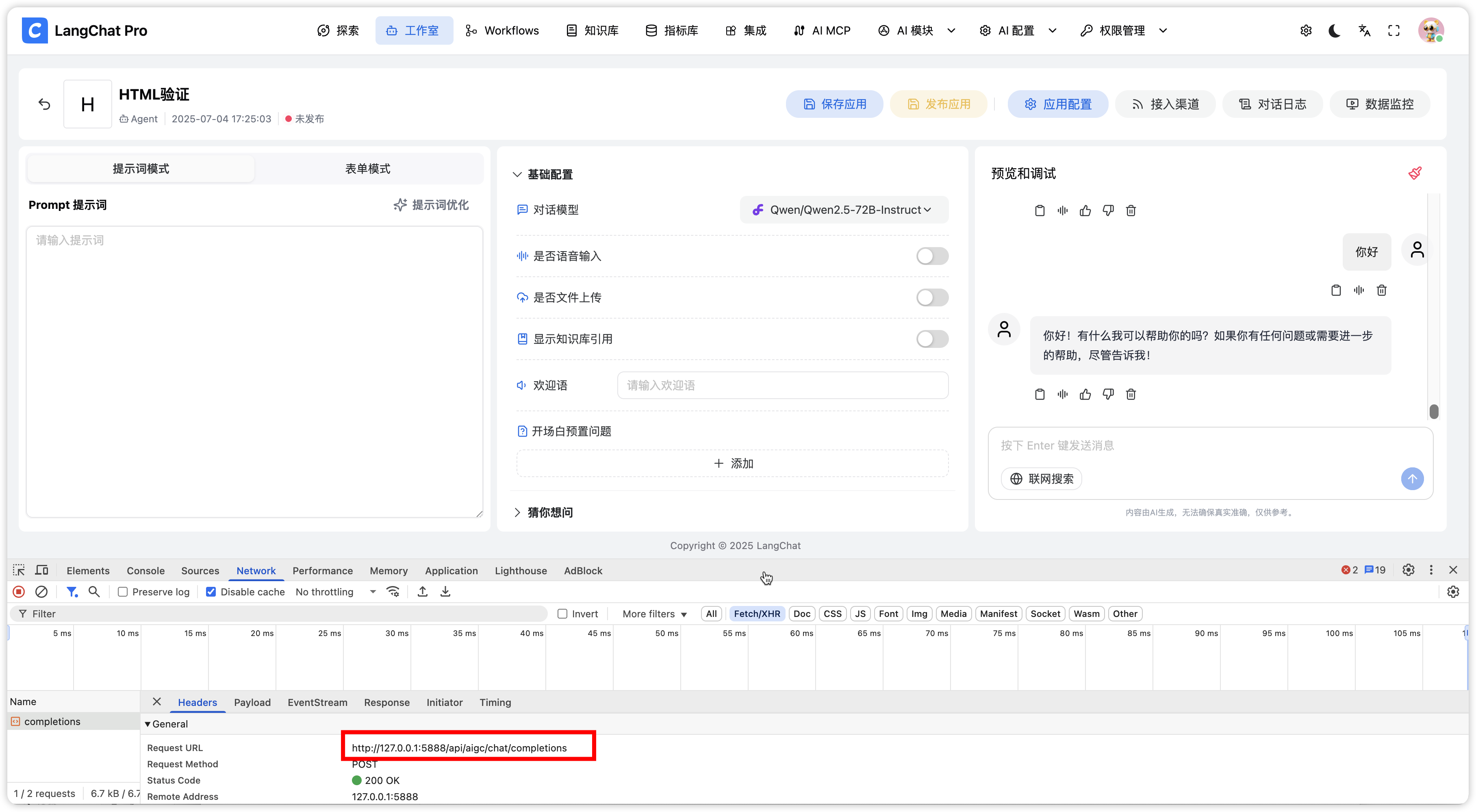 首先,用 Agent 聊天时候,我们可以定位到请求的是
 /aigc/chat/completions 接口
对应的前端代码如下:
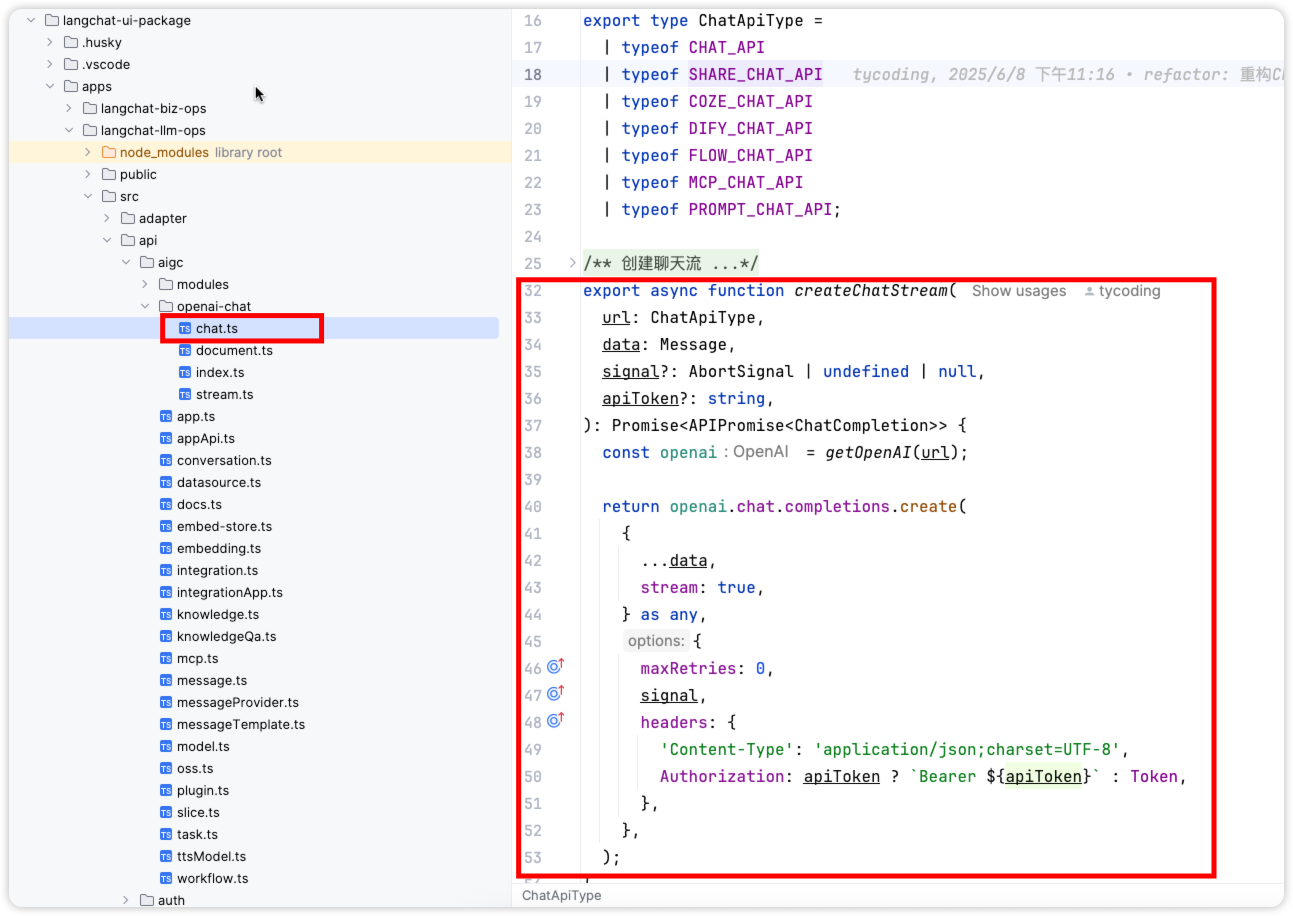
Chat 后端入口
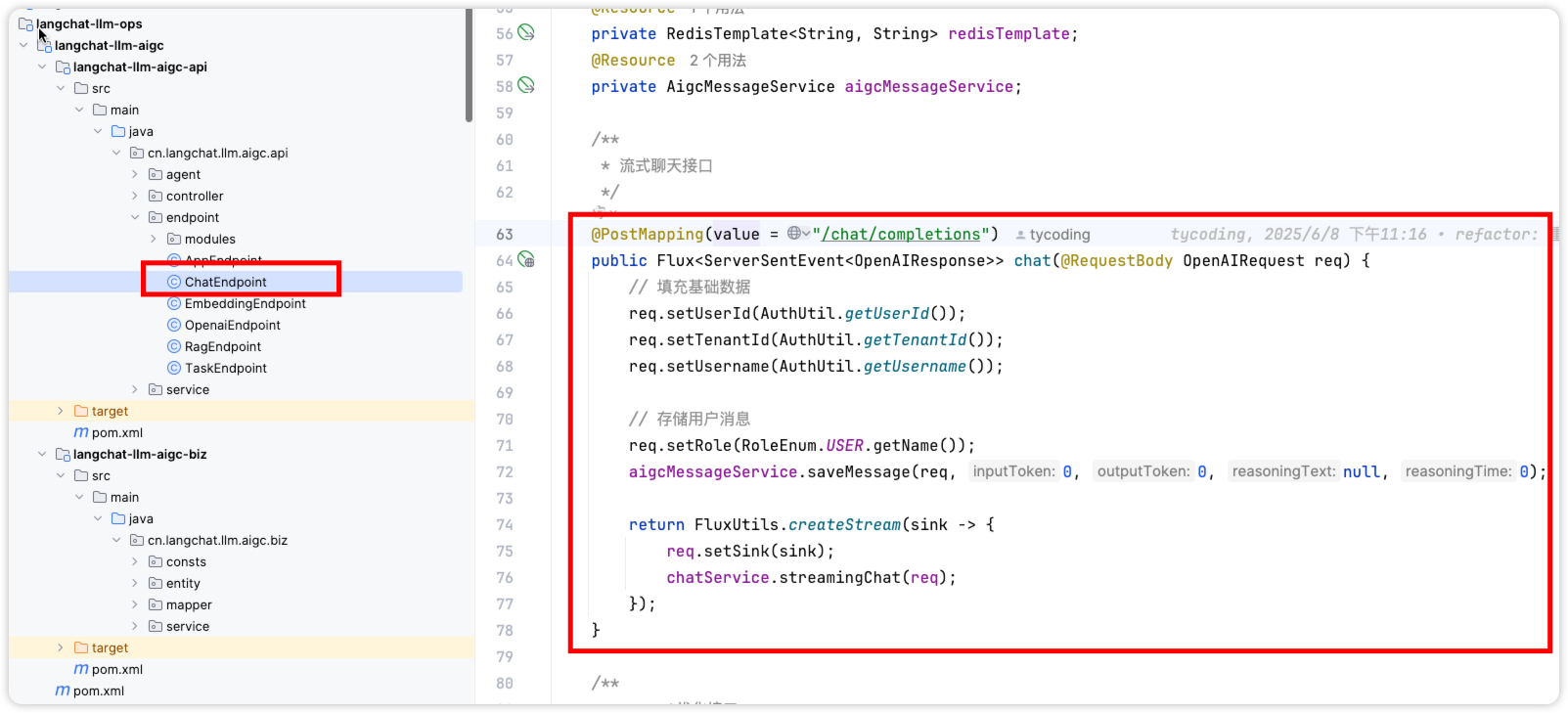 我们针对 Chat 场景定义了一些接口:
核心实现分析
Stream Chat 接口实现
拿 stream chat 接口为例,相关实现如下: 这个实现类,主要用于对请求参数的处理,例如:
- 组装获取 APP 应用关联数据
- 获取关联 Model 对象
- 获取关联的知识库、插件、Mcp 等等
- 日志记录和数据统计等
底层服务调用
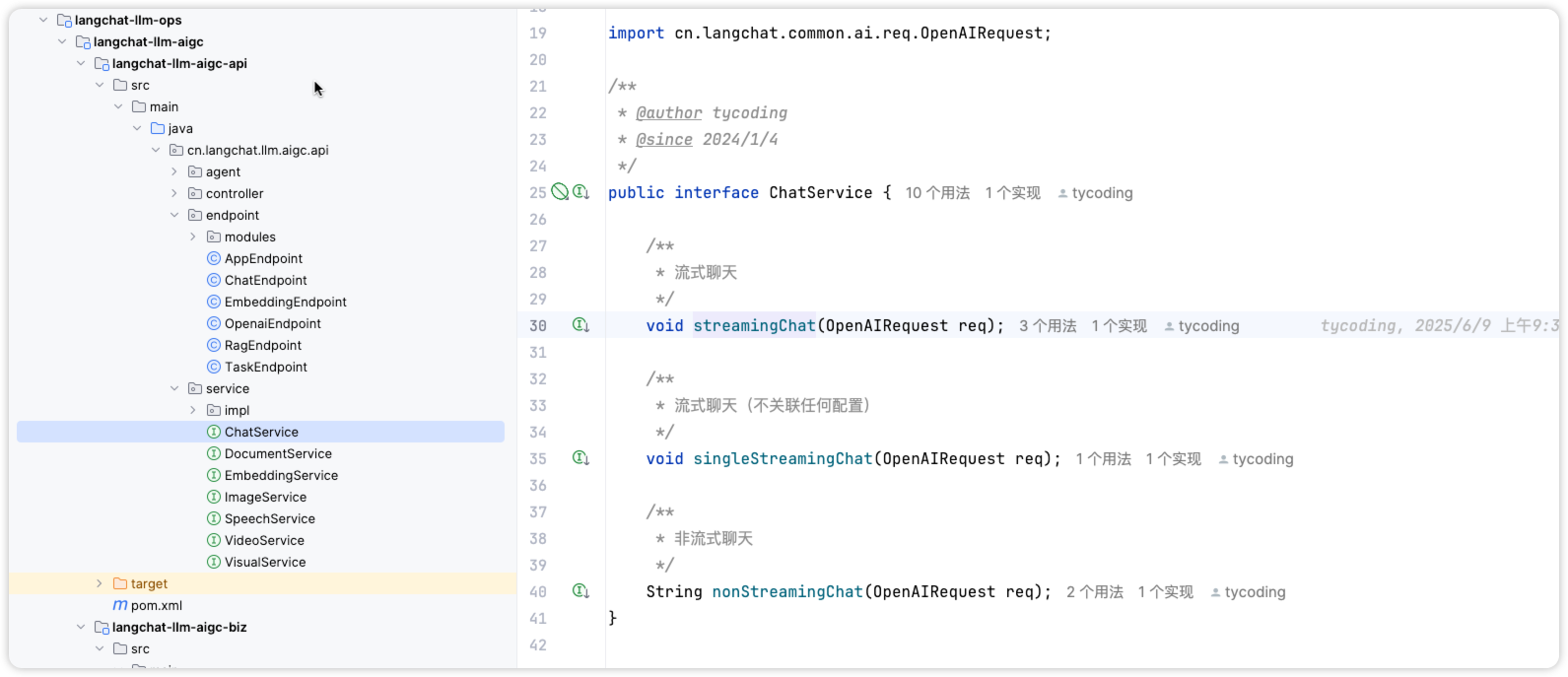
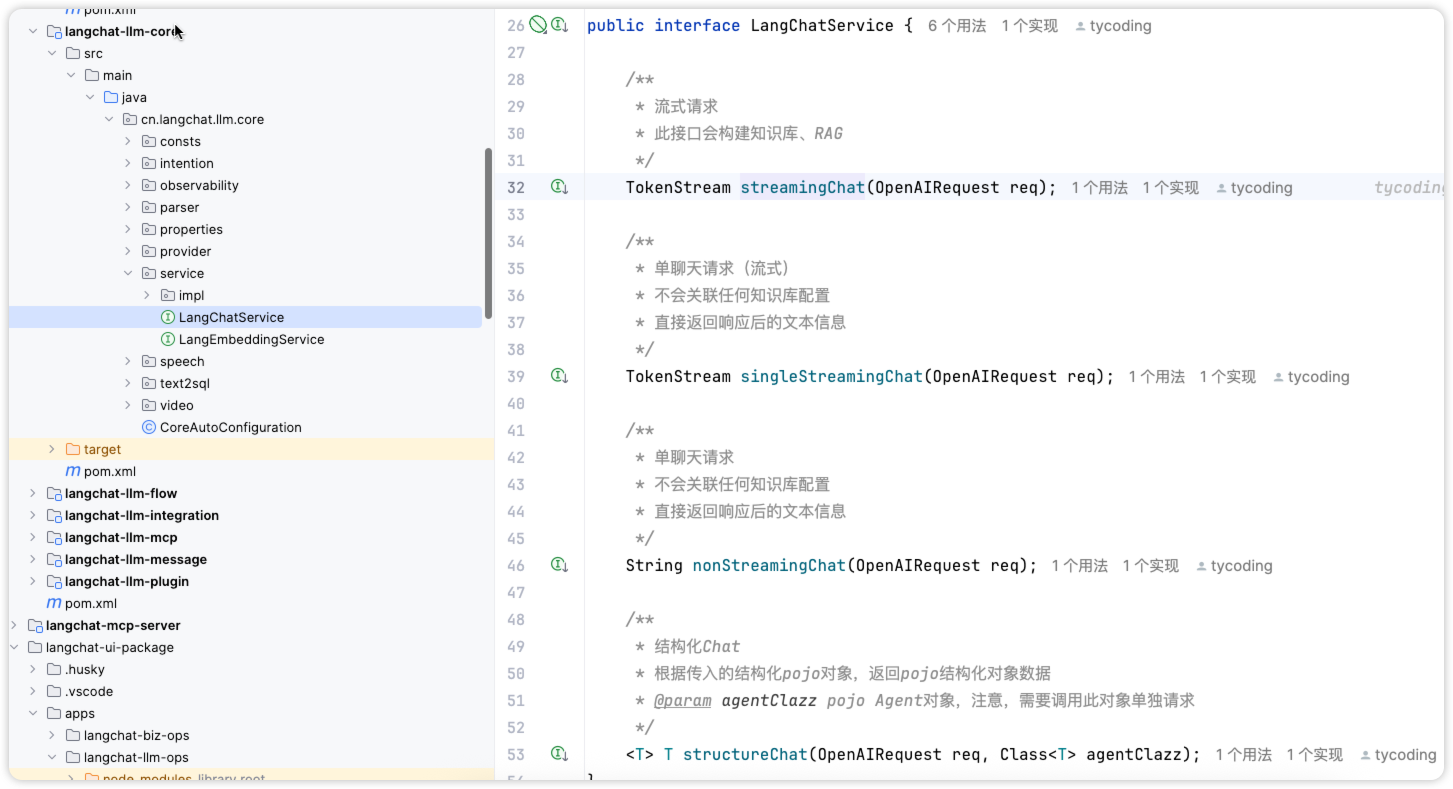
最终,底层会调用LangChatService 接口,针对一些 Chat 接口的封装:
详细代码实现
Controller 层实现
Copy
@RestController
@RequestMapping("/aigc/chat")
public class AigcChatController {

    @Autowired
    private AigcChatService aigcChatService;

    @PostMapping("/completions")
    public Flux<String> streamChat(@RequestBody ChatRequest request) {
        return aigcChatService.streamChat(request);
    }

    @PostMapping("/completions/text")
    public ResponseEntity<ChatResponse> textChat(@RequestBody ChatRequest request) {
        ChatResponse response = aigcChatService.textChat(request);
        return ResponseEntity.ok(response);
    }
}
Service 层实现
Copy
@Service
@Transactional(rollbackFor = Exception.class)
public class AigcChatServiceImpl implements AigcChatService {

    @Autowired
    private ModelService modelService;

    @Autowired
    private KnowledgeBaseService knowledgeBaseService;

    @Autowired
    private PluginService pluginService;

    @Override
    public Flux<String> streamChat(ChatRequest request) {
        // 1. 参数验证和预处理
        ChatContext context = preprocessChatRequest(request);

        // 2. 构建对话上下文
        ChatContext enrichedContext = enrichChatContext(context);

        // 3. 执行流式对话
        return executeStreamChat(enrichedContext);
    }

    private ChatContext preprocessChatRequest(ChatRequest request) {
        // 验证请求参数
        validateChatRequest(request);

        // 获取应用信息
        AppInfo appInfo = getAppInfo(request.getAppId());

        // 获取模型配置
        ModelConfig modelConfig = modelService.getModelConfig(request.getModelId());

        return ChatContext.builder()
                .request(request)
                .appInfo(appInfo)
                .modelConfig(modelConfig)
                .build();
    }

    private ChatContext enrichChatContext(ChatContext context) {
        // 获取知识库信息
        List<KnowledgeBase> knowledgeBases = knowledgeBaseService
                .getUserKnowledgeBases(context.getRequest().getUserId());

        // 获取插件信息
        List<Plugin> plugins = pluginService
                .getUserPlugins(context.getRequest().getUserId());

        // 获取 MCP 配置
        McpConfig mcpConfig = getMcpConfig(context.getRequest().getUserId());

        return context.toBuilder()
                .knowledgeBases(knowledgeBases)
                .plugins(plugins)
                .mcpConfig(mcpConfig)
                .build();
    }

    private Flux<String> executeStreamChat(ChatContext context) {
        return Flux.create(sink -> {
            try {
                // 调用模型服务
                modelService.streamChat(context, sink);
            } catch (Exception e) {
                sink.error(e);
            }
        });
    }
}
流式响应处理
响应格式
流式响应采用 Server-Sent Events (SSE) 格式:Copy
HTTP/1.1 200 OK
Content-Type: text/event-stream
Cache-Control: no-cache
Connection: keep-alive

data: {"id":"chatcmpl-123","object":"chat.completion.chunk","created":1694268190,"model":"gpt-3.5-turbo-0613","choices":[{"index":0,"delta":{"content":"Hello"},"finish_reason":null}]}

data: {"id":"chatcmpl-123","object":"chat.completion.chunk","created":1694268190,"model":"gpt-3.5-turbo-0613","choices":[{"index":0,"delta":{"content":" there"},"finish_reason":null}]}

data: {"id":"chatcmpl-123","object":"chat.completion.chunk","created":1694268190,"model":"gpt-3.5-turbo-0613","choices":[{"index":0,"delta":{"content":"!"},"finish_reason":null}]}

data: {"id":"chatcmpl-123","object":"chat.completion.chunk","created":1694268190,"model":"gpt-3.5-turbo-0613","choices":[{"index":0,"delta":{},"finish_reason":"stop"}]}

data: [DONE]
前端处理逻辑
Copy
async function streamChat(request: ChatRequest): Promise<void> {
    const response = await fetch('/aigc/chat/completions', {
        method: 'POST',
        headers: {
            'Content-Type': 'application/json',
            'Authorization': `Bearer ${token}`
        },
        body: JSON.stringify(request)
    });

    const reader = response.body?.getReader();
    const decoder = new TextDecoder();

    while (true) {
        const { done, value } = await reader!.read();
        if (done) break;

        const chunk = decoder.decode(value);
        const lines = chunk.split('\n');

        for (const line of lines) {
            if (line.startsWith('data: ')) {
                const data = line.slice(6);
                if (data === '[DONE]') {
                    // 对话完成
                    return;
                }

                try {
                    const parsed = JSON.parse(data);
                    // 处理流式数据
                    handleStreamData(parsed);
                } catch (e) {
                    console.error('解析流式数据失败:', e);
                }
            }
        }
    }
}
性能优化策略
1. 连接池管理
Copy
@Configuration
public class WebFluxConfig {

    @Bean
    public ConnectionPool connectionPool() {
        return ConnectionPool.builder()
                .maxConnections(1000)
                .maxIdleTime(Duration.ofSeconds(20))
                .maxLifeTime(Duration.ofMinutes(10))
                .build();
    }
}
2. 背压处理
Copy
@Service
public class ChatService {

    public Flux<String> streamChat(ChatRequest request) {
        return Flux.create(sink -> {
            // 设置背压策略
            sink.onRequest(n -> {
                // 处理背压
                processBackpressure(n, sink);
            });
        })
        .onBackpressureBuffer(1000) // 缓冲区大小
        .onBackpressureDrop() // 丢弃策略
        .timeout(Duration.ofSeconds(30)); // 超时设置
    }
}
3. 缓存策略
Copy
@Service
public class ChatService {

    @Cacheable(value = "chat_context", key = "#request.hashCode()")
    public ChatContext buildChatContext(ChatRequest request) {
        // 构建对话上下文
        return buildContext(request);
    }
}
监控和日志
性能监控
- 响应时间监控
- 并发连接数监控
- 错误率统计
- 资源使用率监控
日志记录
Copy
@Slf4j
@Service
public class ChatService {

    public Flux<String> streamChat(ChatRequest request) {
        log.info("开始流式对话,请求ID: {}, 用户ID: {}",
                request.getRequestId(), request.getUserId());

        return Flux.create(sink -> {
            try {
                // 执行对话逻辑
                executeChat(request, sink);

                log.info("流式对话完成,请求ID: {}", request.getRequestId());
            } catch (Exception e) {
                log.error("流式对话失败,请求ID: {}, 错误: {}",
                        request.getRequestId(), e.getMessage(), e);
                sink.error(e);
            }
        });
    }
}
错误处理
异常分类
- 参数验证异常
- 权限验证异常
- 模型调用异常
- 网络连接异常
- 系统资源异常
错误响应格式
Copy
{
    "error": {
        "code": "INVALID_PARAMETER",
        "message": "参数验证失败",
        "details": "用户ID不能为空"
    },
    "timestamp": "2024-01-01T12:00:00Z",
    "requestId": "req-123456"
}
通过以上架构设计,Chat 模块实现了高性能、高可用的流式对话功能,为用户提供了流畅的 AI 交互体验。